How WMS Pricing Works (and What Vendors Don't Advertise)
WMS pricing is rarely the monthly sticker price alone. Most mid-market quotes stack a base platform fee, seats or volume bands, modules, and one-time implementation, then add integrations, data cleanup, and renewal escalations that vendors treat as separate line items. Decode the model first, then model three-year total cost of ownership before you sign.
WMS pricing is a stack, not a sticker. The monthly number on a sales deck is usually only the software layer. Underneath it sit seats or volume bands, modules, implementation, integrations, data cleanup, hardware, and renewal escalations that vendors treat as separate line items. If you only budget the headline fee, your first-year spend will miss the mark.
A WMS pricing breakdown is the full map of how a warehouse management system (WMS) charges you over time: the commercial model, the one-time project costs, and the recurring fees that show up after go-live.
This guide explains how the common models work, what vendors quietly leave off the quote, and how to compare offers on total cost of ownership (TCO) instead of sticker shock. For absolute dollar ranges by company size, see our companion piece on how much a WMS costs in 2026. Here the focus is structure: how the bill is built, and where buyers get surprised.
How do WMS vendors structure pricing?
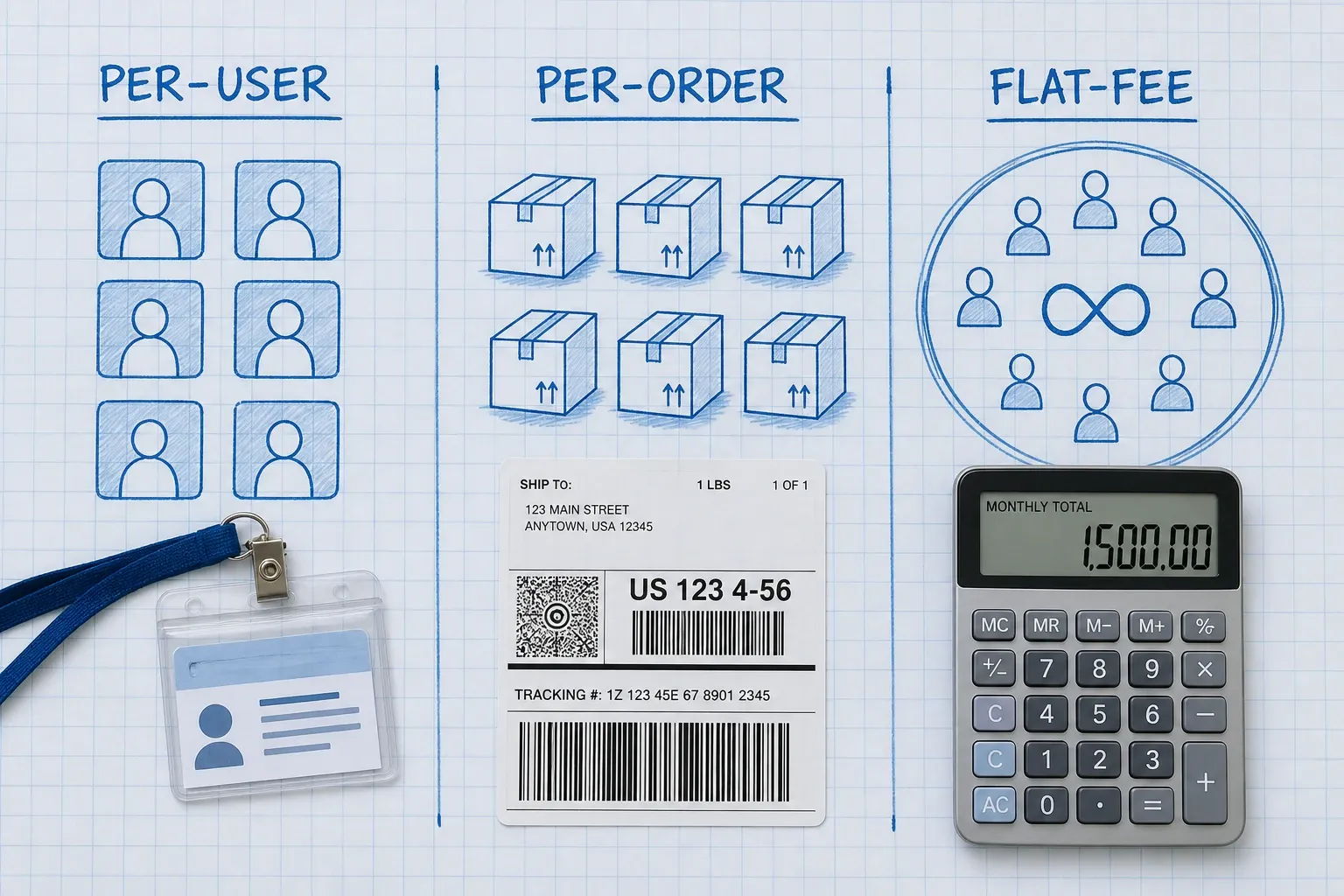
Most mid-market cloud platforms mix a few building blocks. Learn the blocks before you negotiate the number.
Per-user or per-seat fees
You pay a base platform fee, then a monthly charge for each named or concurrent user. Industry roundups in 2026 commonly put seats in the $100 to $300 per user per month range, on top of a $500 to $2,000 base fee. That looks simple when you have eight people on the floor. It looks different when Black Friday temps, a second shift, or a new returns desk each need a login.
Per-user pricing creates a quiet incentive problem: teams share credentials to avoid buying seats. Shared logins destroy the audit trail you bought the WMS to create. If a vendor leads with seats, ask whether seasonal or concurrent licenses exist, and what happens when you cross a tier for one busy month.
Per-order or per-transaction fees
Some platforms charge cents per order, shipment, or API call. On paper it feels fair. You grow, they grow with you. In practice it taxes the exact success you want. Convert every per-order quote into a monthly number at peak volume, not average volume. A rate that looks fine at 8,000 orders can sting at 25,000 in November.
Flat-fee tiers
A smaller set of vendors sell monthly or annual tiers with unlimited users inside a volume or warehouse band. Flat fees trade flexibility for predictability. They reward growth in headcount and punish you only when you outgrow the tier. Ask what triggers the next band, and whether one seasonal month re-prices the whole year.
On-premise perpetual licenses
You still see large upfront licenses for on-premise or private-cloud installs. After the license, annual maintenance commonly runs 15 to 25 percent of the original license forever. That model can make sense for highly regulated or heavily customized environments, but most mid-market ecommerce brands now evaluate cloud first.
According to Gartner commentary summarized in Made4net's 2026 Magic Quadrant takeaways, more than 85 percent of new WMS deals are now cloud. The same research notes that cloud pricing still confuses buyers because there is no single de facto standard model, and long-term costs can look unreasonably high when you stretch the math over 10 to 15 years.
What costs do vendors leave off the sticker price?
Vendors are not always hiding fees to trick you. Sales decks lead with the competitive monthly number. Everything else lives in a statement of work, an appendix, or a "we'll scope that later" conversation. Treat those later items as part of the price today.
Implementation and configuration
Implementation is often as large as first-year software spend. Small operations may see $5,000 to $30,000. Mid-market projects commonly land in the tens or hundreds of thousands once workflows, locations, and roles are configured. Gartner Research VP Dwight Klappich has put the effort at roughly 4,000 to 12,000 hours and $250,000 to well over $1 million for typical projects, depending on scope. Your quote should name hours, roles, and what "out of scope" means in writing.
Integrations that are "included" until they are not
"Standard connectors" for Shopify, Amazon, or a popular ERP often cover the happy path. Custom fields, wholesale rules, multi-warehouse logic, and edge cases still need development. Budget an extra 30 to 50 percent above the first integration quote for real-world work, then ask who maintains the connector when your ERP pushes a major release.
Data migration and master data cleanup
Vendors quote migration. They rarely quote the cleanup that makes migration possible. Industry guides such as CPCON's 2026 WMS cost breakdown note that organizations often find 15 to 30 percent of master data contains errors (wrong dimensions, missing weights, bad slot configs) that must be fixed before go-live. That cleanup cost falls on you, and it can run from low five figures into the mid five figures for mid-market catalogs.
Modules, warehouses, and premium support
Multi-warehouse packs, advanced reporting, marketplace connectors, and phone support frequently sit outside the base plan. A $200 to $2,000 monthly add-on looks small until you stack three of them. Ask for a line-item list of every module you need on day one and on day 365.
Renewal escalations
SaaS contracts often allow 10 to 20 percent annual increases unless you negotiate a cap. Model year two and year three with escalation baked in. A "cheap" year-one deal that jumps hard at renewal is not a cheap deal.
Hardware and productivity dip
Scanners, mobile devices, label printers, and Wi-Fi upgrades are easy to forget when the conversation stays on software. So is the productivity dip while the floor learns new workflows. Those weeks are part of your real cost, even if no invoice says "learning curve."
Why does first-year cost overrun the original quote?
Industry analyses of WMS projects repeatedly find the same pattern: the average project comes in about 25 to 40 percent over its original budget, mostly because line items were never in the proposal. Separately, vendor and analyst guides report that total first-year cost is often 20 to 50 percent higher than the software subscription alone once implementation, training, hardware, and integrations are included.
Those two numbers are not the same problem. The first is scope creep and missing work. The second is incomplete quoting. Both show up as "the WMS cost more than we thought." Fix them the same way: force a written three-year TCO before procurement signs.
If you are building the internal case, pair this pricing lens with how to calculate WMS ROI. A clean ROI story dies fast when finance discovers a $40,000 integration that never appeared in the deck.
How should you compare WMS quotes apples to apples?
Stop ranking vendors by monthly sticker price. Rank them by modeled cash out over three years under your growth plan.
Convert every model into the same units
Pick two unit costs and force every quote into both:
- Cost per active warehouse user at peak season headcount
- Cost per order at peak-month volume
Per-user vendors look expensive on the first metric. Per-order vendors look expensive on the second. Flat-fee vendors look boring on both, which is often the point.
Price the stack, not the SKU
Build a simple spreadsheet with these rows for each vendor:
- Base platform / tier fee
- Seats or volume fees at today, +12 months, and peak
- Required modules and extra warehouses
- Implementation and training (vendor quote + your internal hours)
- Named integrations (plus a 30 percent contingency)
- Data cleanup and migration
- Hardware and devices
- Premium support
- Assumed renewal increase in years two and three
Then sum years one through three. The lowest year-one quote often loses.
Ask the questions vendors hope you skip
Bring these into every late-stage call:
- Are users named, concurrent, or unlimited inside the tier?
- What happens if we exceed the volume band for one month?
- Which integrations are native, which are partner, and which are custom?
- Who owns connector maintenance after ERP or marketplace API changes?
- Is data migration a fixed fee or time and materials?
- What is excluded from implementation?
- Can we cap annual price increases in writing?
- What does exit look like (data export format, timeline, fees)?
If a salesperson cannot answer without "we will get back to you," treat the unknown as a cost risk, not a footnote.
Which pricing model fits which warehouse?
There is no universally best model. There is a best fit for your growth shape.
Stable headcount, steady volume. Per-user SaaS can be fine if seats stay flat and you refuse shared logins. Confirm concurrent options for floaters.
Fast hiring or heavy seasonal temps. Flat-fee or unlimited-user tiers beat per-seat math. Per-order fees can still punish peak months, so model November and Cyber Week explicitly.
High order growth, lean team. Flat fees or carefully capped volume bands beat per-transaction pricing. Watch API overage fees if you automate heavily.
Multi-warehouse expansion. Ask whether sites are priced separately. Site-by-site pricing can quietly double the bill when you open a second building.
Small operation still on spreadsheets. Price matters, but so does whether you even need a full WMS yet. Our guide on WMS for small business walks through the readiness signals before you buy seats you will not use.
Tools like BinLogic WMS are built for mid-market brands that want warehouse execution without enterprise quote theater. When you evaluate any vendor, including us, insist on the same transparent stack: what is in the subscription, what is one-time, and what changes when you grow.
How do you keep WMS pricing honest after you sign?
The contract is not the finish line. Pricing surprises also show up in year two.
Track actual seats issued versus seats paid. If people share logins, fix the process or buy the seats. Shadow IT and shared credentials create compliance holes and fake savings.
Review module usage quarterly. Paying for advanced labor management or a BI pack you never open is a pricing problem you control.
Revisit integration maintenance after every major ERP or marketplace change. Treat connector health as an operating cost, not a one-time project.
When renewal talks start, bring your three-year model and your usage data. Vendors negotiate harder when you can show what you use, what you do not, and what a switch would cost.
If you are still shortlisting platforms, use a structured buying process like our mid-market WMS buying guide so pricing sits beside fit, implementation risk, and integration depth instead of dominating the decision alone.
What does a practical WMS pricing breakdown look like?
Here is a worked pattern for a mid-market single-warehouse brand, not a quote from any one vendor.
Year-one software. Base platform plus seats or a flat tier: often a few thousand dollars a month once you include the modules you actually need.
Year-one project. Implementation, training, data cleanup, and integrations: commonly another large chunk that rivals or exceeds the subscription.
Hardware. Scanners and devices: a one-time capital or lease line that still belongs in the model.
Years two and three. Subscription with escalation, lighter services, occasional enhancements, and connector maintenance.
Industry TCO benchmarks often land near $10,000 per user over five years (about $167 per user per month) when licensing, maintenance, and standard support are averaged together. Use that as a sanity check, not a target. Your order volume, warehouse count, and integration map will move the number.
The vendors who win trust are the ones who put the full stack on one page early. The ones who only sell the sticker price force you to discover the rest in change orders.
Closing: buy the model, not the marketing number
WMS pricing works like warehouse receiving. The carton label is not the ASN. Open the box.
Start with the commercial model (seats, orders, or flat). Add every one-time project cost. Add every recurring add-on. Convert the total into peak-month unit costs. Cap renewals in writing. Then decide.
If you want a second opinion on how a transparent mid-market WMS subscription should read, talk to the BinLogic team with your peak headcount, peak order volume, and integration list ready. A good pricing conversation starts with your operating reality, not a generic starting-from number.
-- Related reading: How Much Does a WMS Cost? A Realistic 2026 Breakdown -- Related reading: How to Calculate WMS ROI (and Make the Case Internally) -- Related reading: Cloud WMS vs On-Premise: Pros and Cons
Frequently asked questions
What are the main WMS pricing models?
Most cloud WMS vendors price with a base platform fee plus per-user seats, per-order or per-shipment fees, flat monthly tiers with unlimited users, or a custom mix. The model matters as much as the dollar amount because seats punish hiring and per-order fees punish peak volume.
Why is the first-year WMS bill higher than the sticker price?
Implementation, integrations, data migration, training, and scanners usually sit outside the headline subscription. Industry analyses find total first-year cost often lands 20 to 50 percent above the software line alone, and many projects still overrun the original budget by 25 to 40 percent.
Is per-user WMS pricing always a bad deal?
Not always. Per-user pricing can be fair for a small, stable team with predictable headcount. It becomes expensive when you add seasonal temps, night shifts, or growth hires, and it can push staff to share logins, which weakens your audit trail.
What should I ask vendors before signing a WMS contract?
Ask for a written three-year total cost that includes seats at peak headcount, named integrations, data migration scope, training, premium support, multi-warehouse fees, and renewal escalation caps. Convert every quote into cost per order at your peak month, not your average month.
How does WMS pricing differ for cloud vs on-premise?
Cloud WMS is usually a subscription with hosting and updates included. On-premise still means a larger upfront license plus annual maintenance that commonly runs 15 to 25 percent of the license each year. More than 85 percent of new WMS deals now go cloud, but Gartner still warns that long-term cloud pricing can confuse buyers.
Run your warehouse without losing a single unit.
Binlogic is the warehouse management system for brands and retailers who run their own fulfillment. Receive, count, pick, pack and ship, with every move scanned. See it in a 30-minute demo.
Get a demo