

Dashboard
Dashboard
The Dashboard is your operational command center. It provides a quick overview of key performance indicators (KPIs) for your warehouse operations, updated in real time.
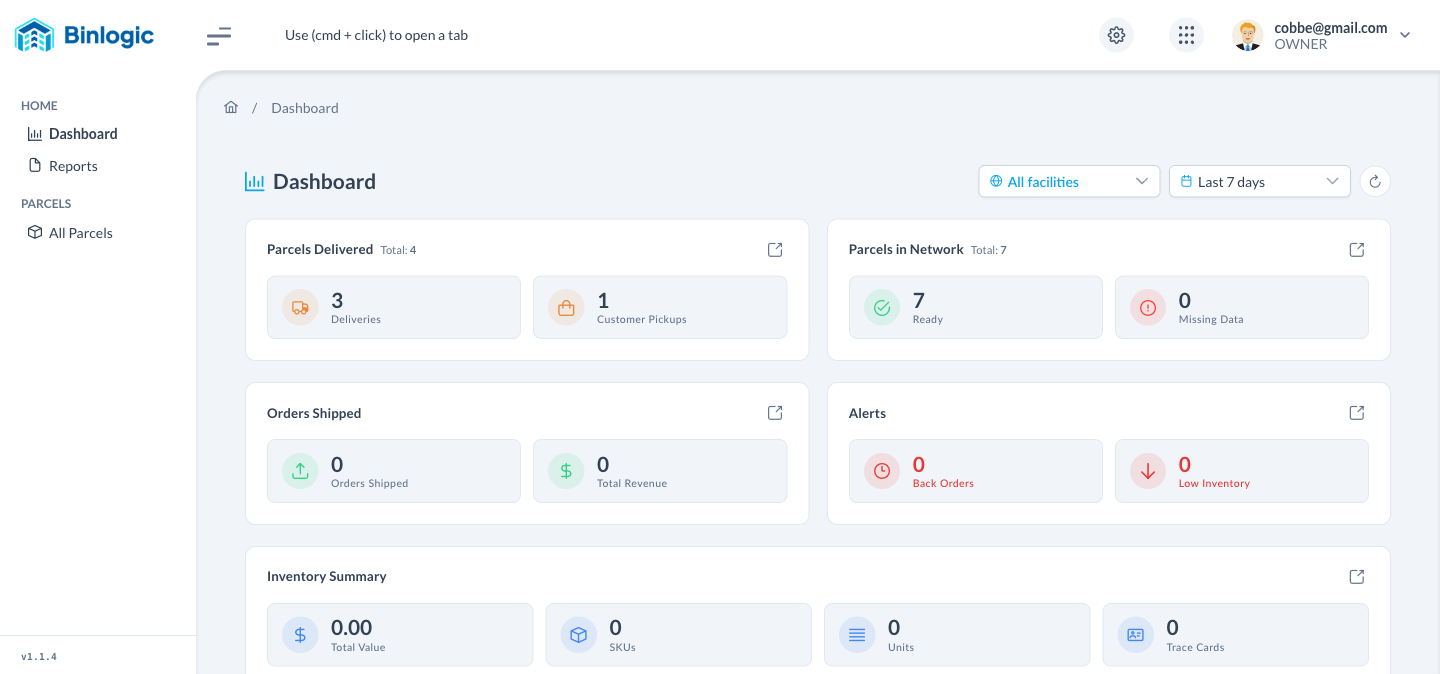
The Dashboard displays KPI cards with your operational metrics. Use the filters above to adjust the period and facility.
Select Facility and Date Range at the top to filter all KPIs simultaneously.
Cards with key metrics: Parcels Delivered, Parcels in Network, Orders Shipped, Alerts and Inventory Summary.
Critical indicators: Back Orders and Low Inventory require your immediate attention. Click ↗️ to go to the detailed section.
Demo completed!
Global Filters
In the top right corner of the Dashboard you’ll find two filters that affect all KPIs simultaneously:
| Filter | Options | Function |
|---|---|---|
| Facility | All facilities, or a specific facility | Filter data by physical location |
| Date Range | Last 7 days, Last 30 days, Last 90 days, Custom Range | Define the analysis period |
| Refresh (↻) | — | Reload data without changing page |
KPI Cards
The Dashboard displays the following KPI cards:
Parcels Delivered
Section titled “Parcels Delivered”Shows the total packages delivered in the selected period, broken down into:
- Deliveries — Deliveries made by the courier
- Customer Pickups — Picked up at location by the customer
Parcels in Network
Section titled “Parcels in Network”Packages currently in your operations network:
- Ready — Ready for dispatch or delivery
- Missing Data — With incomplete data requiring attention
Orders Shipped
Section titled “Orders Shipped”Summary of shipped orders:
- Orders Shipped — Total orders processed and shipped
- Total Revenue — Total revenue generated
Alerts
Section titled “Alerts”Alert indicators requiring immediate action:
- Back Orders — Pending orders due to stock shortage
- Low Inventory — SKUs with inventory below minimum
Inventory Summary
Section titled “Inventory Summary”Consolidated inventory view:
- Total Value — Total monetary value of inventory
- SKUs — Number of unique products
- Units — Total physical units
- Trace Cards — Active traceability cards
App Switcher
The grid icon (⫶⫶⫶) in the header lets you quickly switch between Novacrest ecosystem applications:
| Application | Function |
|---|---|
| Omniorders | Operator order management |
| Shelfter | Shelving and storage management |
| Xenvio | Shipping and logistics management |
| Binlogic | Warehouse Management System (this app) |
| Shipedge | Fulfillment platform |
| EndZone | Last-mile delivery |
| Novacrest | Logistics solutions ecosystem |