
















Barcode Scanning in the Warehouse: A Complete Guide
Warehouse barcode scanning assigns a unique scannable code to every product, bin, and pallet, then uses handheld or fixed scanners to update your WMS in real time at each step. This eliminates manual data entry, cuts picking errors, and gives you live inventory positions throughout the facility. A well-implemented barcode system is the operational foundation of any accurate, automated warehouse.
Barcode scanning is how a warehouse turns physical movement into digital data. Every time an operator scans a label on a product, bin, or pallet, the system records exactly what moved, where it is, and who touched it. That real-time update is what keeps your inventory counts accurate and your picking instructions reliable.
Warehouse barcode scanning is the process of reading unique codes on physical items and locations to automatically update a Warehouse Management System (WMS) in real time, replacing manual data entry at every step from receiving to shipping.
Without scanning, every warehouse transaction relies on a human writing something down or typing something in. Errors compound. By the time you run a physical count, the gap between your system and reality can be thousands of units. Scanning collapses that gap to near-zero at the point of each transaction.
How Does Barcode Scanning Work in a Warehouse?
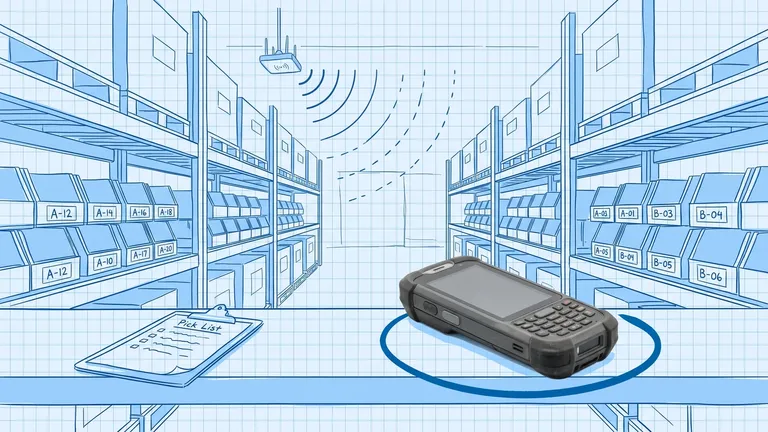
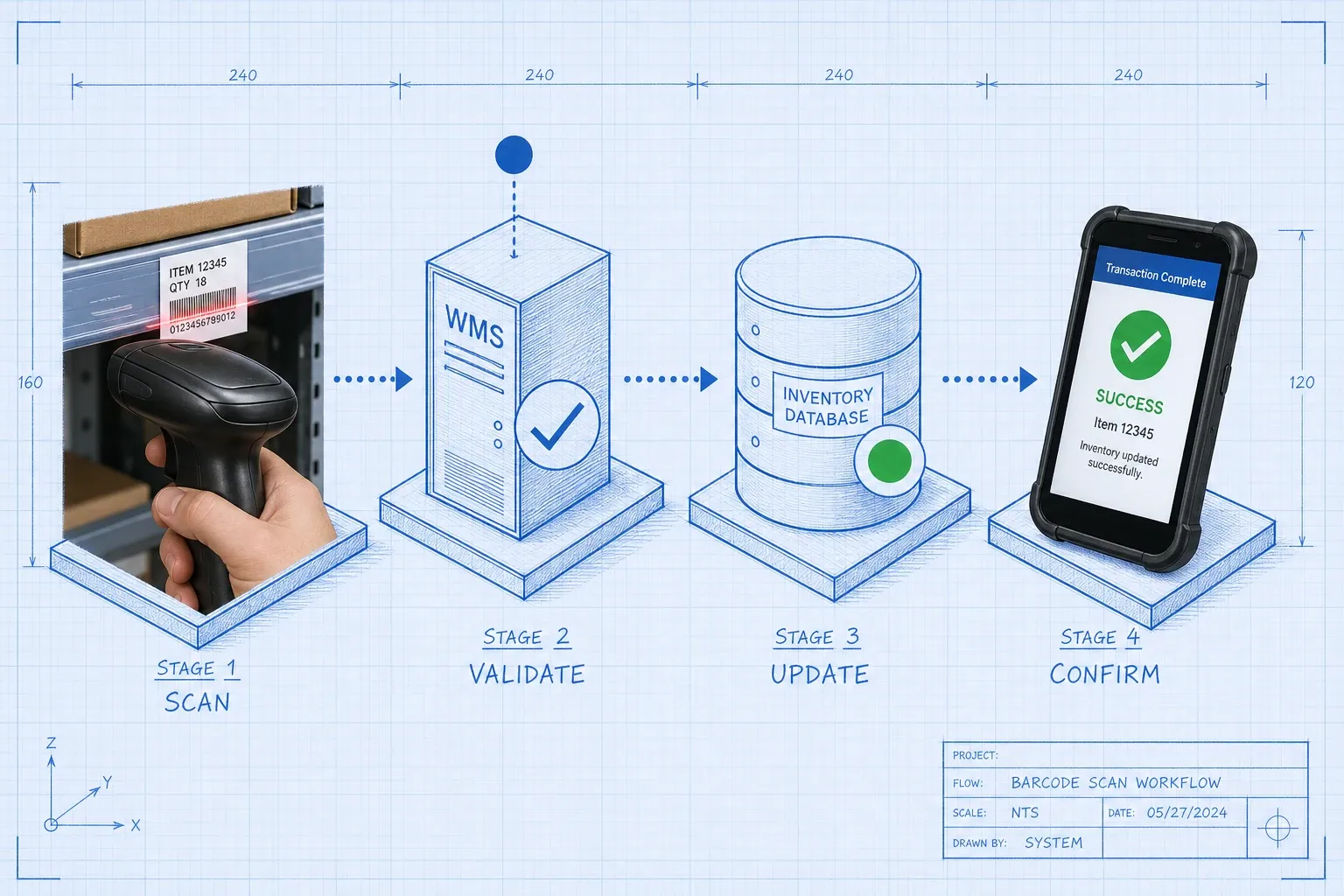
The mechanics are straightforward. Each product, bin location, pallet, and document in your warehouse carries a barcode label with a unique identifier. When an operator scans that label, the handheld device sends the data to your WMS over Wi-Fi. The WMS looks up what it expects at that point in the workflow, validates the scan, updates the inventory record, and sends back a confirmation or next instruction. The whole exchange takes under a second.
The four main workflows where scanning does the heavy lifting:
Receiving. When a truck arrives, the operator scans each pallet or carton as it comes off the dock. The WMS matches the scanned codes against the advance shipment notice (ASN) or purchase order and flags any discrepancy immediately. Problems get caught at the door, not three days later when a pick fails.
Putaway. After receiving, the operator scans the item barcode and then the destination bin barcode to confirm where it was placed. The WMS records the location. Now when a picker needs that item, the system knows exactly which bin to send them to.
Picking. The operator's device shows the bin location and the item barcode to look for. They scan both to confirm they picked the right product from the right place. The WMS removes the quantity from that location and moves the order forward.
Shipping. Each picked item gets scanned into a shipping container. The WMS verifies every item on the order is present before generating a shipping label. Nothing ships unless the scan confirms it.
What Types of Barcodes Are Used in Warehouses?
Three formats cover most warehouse operations:
1D (linear) barcodes like UPC-A, Code 128, and ITF-14 encode a single identifier, typically a product code or case ID. They are simple to print and read, and most warehouses still run heavily on them. The downside: a 1D barcode can only hold one piece of information, so a case with a lot number and an expiry date needs multiple labels.
2D barcodes like GS1 DataMatrix and QR codes encode multiple data fields in the same label. A single 2D label can hold a product code, lot number, expiry date, and serial number at once. This eliminates label clutter and the risk of scanning the wrong code from a carton that carries four.
GS1-128 is a specific 1D encoding standard widely used in logistics for shipping containers and pallets. It uses structured Application Identifiers (AI codes) to indicate what each data field means, so any compliant system can parse the label without custom mapping.
The shift from 1D to 2D is accelerating. Research commissioned by GS1 US and conducted by VDC Research in late 2025 found that facilities relying primarily on 1D barcodes report a 7% first-pass scan failure rate and incur over $800,000 annually in shipment errors, rescan labor, and relabeling costs. Switching to 2D barcode workflows can cut those operational costs by more than 60%, saving over $500,000 per facility each year.
What Hardware Do You Need?
The hardware stack is simple: labels, scanners, network, and software.
Labels. Print at 300 DPI minimum. Use polyester or laminated paper labels in high-traffic areas and on bins that take regular forklift hits. Replace labels when they show damage. A torn or smudged label is the most common cause of a no-read.
Handheld scanners. Rugged Android-based mobile computers (from Zebra, Honeywell, or Datalogic) are the standard for most operations. They handle drops, dust, and temperature swings that consumer smartphones cannot. For dock doors and narrow-aisle forklifts, vehicle-mounted terminals keep the operator's hands free. Wearable ring scanners work well in high-velocity pick operations where speed matters more than flexibility.
Wi-Fi coverage. Scanners communicate over Wi-Fi, so your network needs to cover every work zone without dead spots. Dock doors, corner staging areas, and mezzanine levels are the usual gaps. Walk the floor with a signal tester before go-live. Configure your devices to cache scans locally and sync when signal returns, so a brief dropout does not stop the operation.
WMS. The scanner hardware is only useful if your WMS can receive and validate scans in real time. Most modern platforms, including BinLogic WMS, ship with mobile scanning apps that run directly on rugged handhelds and connect to the system over your existing Wi-Fi. You configure the workflows once in the system, and the app enforces them on the floor automatically.
How Do You Connect Barcode Scanning to Your WMS?
There are three integration approaches, roughly in order of complexity:
Keyboard emulation. The scanner acts as a keyboard wedge and types the barcode string directly into whatever field is active on the device screen. Simple to set up, but fragile: the ERP or WMS must be the active application at all times, and there is no middleware to handle errors or data transformation.
Middleware. A translation layer sits between the scanner and the WMS. It parses the barcode, extracts the relevant fields (using GS1 Application Identifiers if needed), validates the data against master records, and calls the WMS API to execute the transaction. This is the standard approach for operations with any real volume. It gives you clean error handling, retry logic, and a single place to update data mapping when supplier labels change.
Native WMS scanning. Many WMS platforms have purpose-built mobile apps that handle the full scan-validate-update loop natively. The scanner talks directly to the WMS, which serves instructions to the device and validates each scan against the workflow. This eliminates the middleware layer and is the cleanest option if your WMS supports it.
Whichever approach you use, build in offline resilience. If the WMS server goes down or Wi-Fi drops in a corner of the facility, scanners should queue transactions locally and sync automatically when the connection returns.
What Causes Scan Failures and How Do You Fix Them?
Scan failures slow the floor and frustrate operators. The most common causes:
Label quality. Wrinkled, torn, or low-contrast labels cause most no-reads. Audit labels at receiving and replace any that show wear. If supplier labels are consistently poor quality, negotiate label specifications with the vendor or apply your own over-labels at receiving.
Wrong scanner for the barcode type. Not all scanners read all barcode types. Make sure your devices are configured to read the formats you actually use. For 2D codes, you need an imager, not a standard laser scanner.
Wi-Fi dead zones. Operators in low-signal areas see scan timeouts. Map your Wi-Fi coverage before go-live and add access points to close the gaps.
Label placement. Labels on curved surfaces, recessed areas, or surfaces that get wrapped in stretch film are harder to read. Standardize placement across your product lines and document it for receiving staff.
According to VDC Research, 31% of warehouse respondents said that multiple barcodes on a single carton increase the risk of scanning the wrong code. If your suppliers ship cases with four different barcode formats, your operators are making judgment calls on every scan. Standardizing to GS1-128 or 2D on inbound cartons removes the ambiguity.
How to Set Up Barcode Scanning: A Practical Checklist
If you are setting up scanning for the first time or tightening up an existing system, work through these steps:
- Label every location first. Bin locations, rack faces, dock doors, and staging areas all need barcodes before you train anyone on scanning. If a location is not labeled, operators cannot confirm putaway or picks against it.
- Define your barcode formats. Choose the encoding standard for each label type (product, location, pallet). Document the format and share it with your label printing team and any WMS administrator.
- Map your workflows. For each operation (receive, putaway, pick, pack, ship, cycle count), define exactly which barcodes get scanned in which order. Configure these workflows in the WMS before go-live.
- Test Wi-Fi coverage. Walk the entire floor with a scanner and deliberately scan from every corner and zone. Fix any dead spots before training begins.
- Run a pilot. Start with one workflow (receiving is a good choice) and one team. Measure scan success rates and first-pass failure rates for two weeks before rolling out to the full floor.
- Train on scan-first habits. The most important cultural change is getting operators to scan before they physically move an item, not after. Scanning after the fact is what creates the data gaps scanning is supposed to eliminate.
For a deeper dive into how scanning fits into cycle count programs, the cycle counting guide covers frequency strategies and how a WMS-directed count compares to manual paper-based methods.
How Does Barcode Scanning Improve Inventory Accuracy?
Every manual data entry is an opportunity for an error. Typing a 12-digit product code 300 times per shift produces errors. Scanning the same code 300 times per shift produces near-zero errors, because the barcode encodes the correct value and the WMS validates it against what it expects.
The chain of accuracy improvements works like this: scanning at receiving means your system knows exactly what arrived and where it was put. Scanning at picking means orders ship with the right items. Scanning at cycle counts means the system's on-hand count reconciles with the physical count without a full wall-to-wall count. The result is an inventory record that stays accurate day-to-day instead of drifting until the next annual physical.
If you want a baseline for where you stand today, the cost of inventory inaccuracy post walks through how to quantify the financial impact of your current error rate.
Frequently Asked Questions
What is barcode scanning in a warehouse? Warehouse barcode scanning is the process of using handheld or fixed scanners to read unique codes on products, bins, and pallets, then automatically updating your inventory system in real time. Every scan replaces a manual data entry, which cuts errors and gives you an accurate, live view of where every item sits in your facility.
How does barcode scanning integrate with a WMS? When an operator scans a barcode, the device sends the data to your WMS over Wi-Fi. The WMS validates the scan against the expected workflow (receiving, putaway, pick, or ship), updates inventory counts and locations, and sends back a confirmation or next instruction to the device. The whole exchange takes under a second.
What is the difference between 1D and 2D barcodes in a warehouse? A 1D barcode (like a standard UPC) encodes a single identifier such as a product code. A 2D barcode (like a QR code or GS1 DataMatrix) encodes multiple fields in the same label, including lot number, expiry date, and serial number. Switching from 1D to 2D reduces scan failures and eliminates the need for multiple labels on the same carton.
What equipment do I need to set up barcode scanning in my warehouse? You need barcode labels on every product, bin, and pallet; durable handheld scanners (rugged Android-based devices work for most operations); Wi-Fi coverage across all work areas including docks and staging; and a WMS that can receive and validate scan data in real time. Most modern WMS platforms include mobile scanning apps that run directly on the handhelds.
How do I reduce scan failures in my warehouse? Start by auditing label quality and placement. Labels should be printed at 300 DPI or higher, placed flat (not on curved surfaces), and replaced when they show wear or damage. Make sure your Wi-Fi covers every zone including dock doors and corners. For high-volume inbound, consider switching to 2D barcodes, which have a significantly lower first-pass failure rate than 1D labels.
Frequently asked questions
What is barcode scanning in a warehouse?
Warehouse barcode scanning is the process of using handheld or fixed scanners to read unique codes on products, bins, and pallets, then automatically updating your inventory system in real time. Every scan replaces a manual data entry, which cuts errors and gives you an accurate, live view of where every item sits in your facility.
How does barcode scanning integrate with a WMS?
When an operator scans a barcode, the device sends the data to your WMS over Wi-Fi. The WMS validates the scan against the expected workflow (receiving, putaway, pick, or ship), updates inventory counts and locations, and sends back a confirmation or next instruction to the device. The whole exchange takes under a second.
What is the difference between 1D and 2D barcodes in a warehouse?
A 1D barcode (like a standard UPC) encodes a single identifier such as a product code. A 2D barcode (like a QR code or GS1 DataMatrix) encodes multiple fields in the same label, including lot number, expiry date, and serial number. Switching from 1D to 2D reduces scan failures and eliminates the need for multiple labels on the same carton.
What equipment do I need to set up barcode scanning in my warehouse?
You need barcode labels on every product, bin, and pallet; durable handheld scanners (rugged Android-based devices work for most operations); Wi-Fi coverage across all work areas including docks and staging; and a WMS that can receive and validate scan data in real time. Most modern WMS platforms include mobile scanning apps that run directly on the handhelds.
How do I reduce scan failures in my warehouse?
Start by auditing label quality and placement. Labels should be printed at 300 DPI or higher, placed flat (not on curved surfaces), and replaced when they show wear or damage. Make sure your Wi-Fi covers every zone including dock doors and corners. For high-volume inbound, consider switching to 2D barcodes, which have a significantly lower first-pass failure rate than 1D labels.
Plan the route. We deliver the rest.
See how Binlogic powers last-mile logistics — routing, tracking, and the platform that turns the plan into the package on the doorstep.
Book a callback