Why Your WMS Needs a Mobile App (and What to Look For)
A WMS mobile app moves receiving, putaway, picking and counts off the clipboard and onto a handheld, so each task is confirmed by a scan when it happens. Before you buy, check how the app behaves when the Wi-Fi drops, what the device's dust, water and drop ratings actually cover, how long it will get security updates, and how you will enroll and lock it down. Then pilot it in your worst aisles.
Some warehouses already run RF guns on terminal screens or voice picking. Many others, without a mobile app, still lean on a paper pick list, a clipboard and results keyed in at the end of the shift. A mobile app puts the task on a handheld, so each receipt, move, pick and count is confirmed by a scan at the bin, at the moment it happens.
The app is only half the decision. The other half is the device it runs on: how it handles a dropped connection, a dropped unit, a missed security update and a picker wearing gloves. This guide covers both, and ends with a pilot plan you can run before you sign anything. If you want the basics of how scanning itself works, start with our guide to barcode scanning for warehouse inventory.
What warehouse work moves from paper to a handheld?
Receiving, putaway, picking and counts all move. Some exception work, such as damage write-ups, may still need a desk. The reason to move it is that paper records what someone meant to do, while a scan records what they did, at the location where they did it.
Task | On paper | On the handheld | What to check in the app |
|---|---|---|---|
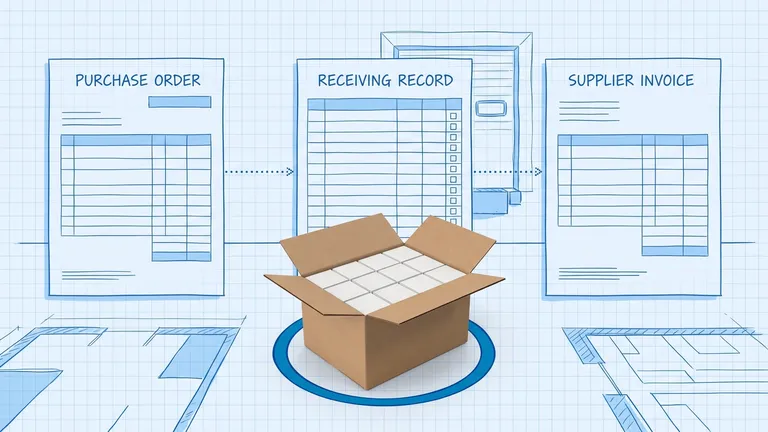
Receiving | Tick off a printed PO, key in counts later | Scan each item against the open PO; shortages and overages show up at the dock | Can it receive partial shipments and flag damaged units? |
Putaway | Write the bin on the receiving sheet | Scan the item, then scan the bin label to confirm | Does it suggest a bin, and can a worker override it with a reason? |
Picking | Walk a printed pick list, cross off lines | Follow the list on screen; a wrong item or wrong bin scan is rejected | Does it support the picking method you use, and does it handle a short pick? |
Cycle counts | Count sheets filled in by hand, entered later | Scan the bin, count, submit; variances go straight to review | Can it run blind counts that hide the expected quantity? |
The cycle-count row matters more than it looks. Counting is especially prone to rework on paper, because a mistake on the sheet can become a second mistake at the keyboard. Our complete guide to cycle counting covers how to set up a count program once the counts run on a handheld.
Will a regular phone do, or do you need a rugged handheld?
It depends on volume, shift length and conditions. Phones with camera scanning or a scanning sled are a legitimate option for receiving, spot counts and lighter picking. High-volume picking all shift, cold rooms, gloves and frequent drops on concrete are where a rugged device earns its price. Either way, to compare devices, you need to know what the ratings on the spec sheet actually mean.
What the IP rating covers, and what it doesn't
The "IP" on a spec sheet comes from IEC 60529, the international standard for the protection that enclosures provide. Under that standard, the first digit covers dust and the second covers water:
- IP5x (dust-protected): some dust can get in, but not enough to interfere with operation.
- IP6x (dust-tight): no dust gets in.
- IPx4: water splashed from any direction has no harmful effect.
- IPx5: water jets from any direction have no harmful effect.
- IPx7: water does not get in in harmful quantity during temporary immersion (tested at 0.15 m to 1 m deep for 30 minutes).
Google's Android Enterprise Recommended program sets IP54 as the minimum for devices it lists as rugged.
The rating says nothing about a scanner gun hitting concrete. IEC 60529 explicitly leaves "mechanical impacts" outside its scope. Drop resistance is a separate test. The same Google requirements list it on its own line, accepting either MIL-STD-810G or IEC 60068-2-31. That IEC test simulates "knocks, jolts and falls" in operational use. When a vendor gives you an IP rating, ask which drop standard the device passed and from what height.
Scanner type and 2D codes
Look at the labels you receive as well as the ones you print. GS1 US says a GS1 DataMatrix can carry the GTIN, expiration date, batch or lot number and serial number in one code. It also notes that not all smartphones can read one, and some need a separate app. GS1 US also says retail is moving toward 2D codes on packaging, that the UPC is not going away, and that a 2D code and a standard UPC may appear side by side during the transition. A device bought today should read both reliably at the angles and distances your racks require, so test it with your actual labels.
How long will a warehouse handheld get security updates?
It's easy to miss on a spec sheet, and it can decide how long a device stays usable.
When Google added rugged devices to Android Enterprise Recommended in 2018, it announced security updates within 90 days of release "for a minimum of five years." The current requirements, for devices validated on Android 16, work differently. They don't set a fixed number of years. Instead, the manufacturer "MUST publish the frequency of security updates" and an "SMR support end date," defined as "the last month and year the device is guaranteed to receive security updates." The device must support at least one OS version update after the version it was validated on. More upgrades are recommended but not required.
Under the current rules, the badge alone doesn't tell you how long the device will be supported. The published end date does. A discounted unit near the end of its update window may need replacing sooner than a newer model, so compare price per supported year, not sticker price.
NIST's mobile security guidance (SP 800-124 Rev. 2) explains why this matters. A device that doesn't receive updates "will remain in a vulnerable state." NIST also advises organizations to "select device models that are current enough to be well supported by the manufacturer." These handhelds are signed in to your WMS. One that stops getting updates is an unpatched computer connected to your inventory.
What to do: get the security-update end date for each model in writing. Compare it with the date you expect to retire the device, and budget for replacement before that date, not after a breach.
What happens when the Wi-Fi drops in the back aisles?
Every app handles a lost signal differently, and the only way to know is to ask and then test it. The barcode scanning guide linked above covers Wi-Fi coverage surveys and local scan storage. As a buyer, ask any vendor to show you the behavior, not just describe it:
- Can a worker finish a pick or a count with no signal, or only view it?
- Where are queued scans stored, and what happens if the battery dies before they sync?
- When two people touch the same bin while one is offline, which update wins, and who is told?
- Does the screen show clearly that the device is offline and how many scans are waiting?
How do you enroll and lock down warehouse handhelds?
Treat floor devices, phones included, as company-owned work tools. Android calls this setup a dedicated device. Its developer documentation describes dedicated devices as "fully managed devices that serve a specific purpose" and gives "inventory management" and "transport and logistics" as examples. These devices can be locked to an allowlist of apps with lock task mode, so the WMS app is the only thing on the screen.
Enrollment time adds up across a fleet, so ask how devices get enrolled. Android's enrollment options include zero-touch, where a device arrives already set up with your apps and security settings and only needs to be turned on, plus QR code, NFC tag and EMM token enrollment.
Two points from NIST apply to a scanner fleet:
- NIST notes that most platforms let only one MDM solution control a device's management APIs. In practice, confirm the WMS app works under the MDM you already run.
- Remote wipe helps when a unit goes missing, but NIST calls remote wipe on its own "a fundamentally unreliable security control." Pair it with device encryption, which Google's current rugged requirements make the default, and wipe every device before you reissue or retire it.
Can pickers use it with gloves, one hand and a full shift?
Your team has to use the device for a full shift, often with gloves on. OSHA notes that high-volume item picking involves "repetitive hand, wrist and shoulder movements," and that cold environments make workers use more force to grip and hold. OSHA does not address scanners, but it stands to reason that a heavy unit with small buttons adds to that load, so weigh devices and test them with gloves on.
In a demo, check for:
- Large tap targets that work with gloves on.
- A physical scan trigger, so the worker never has to tap a small on-screen button to scan.
- Screens that need a scan and a confirm, not typing.
- A device light enough to hold all shift, or a wearable option for high-volume pickers.
- A battery that lasts your longest shift at your real scan rate, or hot-swappable batteries.
OSHA also recommends job rotation and work/rest cycles for fatigue recovery. Those apply on top of good device choice.
How do you pilot a WMS mobile app before rolling it out?
Run the pilot in your hardest conditions, not in a conference room. A short pilot with a handful of devices will tell you more than any demo.
- Pick the worst zone. Choose the back aisles where the Wi-Fi drops, the cold room or the mezzanine.
- Run all four jobs. Do real receiving, putaway, picking and a cycle count on the handhelds, alongside paper so you can compare results.
- Test a lost signal. Ask the vendor what should happen, then switch off an access point mid-pick and check what happens to the scans when it comes back.
- Time a full shift on one battery. Use your busiest shift, not an average one.
- Enroll a new device from the box. Time it, and wipe and reissue one too.
- Test an update on a small group first. NIST recommends pushing updates to a small group of tolerant users first, and weighing whether failed patches can be rolled back.
- Ask the pickers. They will tell you which screens slow them down.
Then fold what you learn into your rollout plan. Our 12-week WMS implementation playbook shows where device rollout fits.
BinLogic is built mobile-first: floor work such as receiving, putaway, picking and cycle counts runs on a handheld device.
Frequently asked questions
Can warehouse staff use regular smartphones instead of rugged handhelds?
Often, yes. It depends on volume, shift length and conditions. Phones with camera scanning or a scanning sled can handle receiving, spot counts and lighter picking. Test them on your real labels, because GS1 US notes that not all smartphones can read a GS1 DataMatrix without a separate app. For high-volume picking all shift, cold rooms, gloves or frequent drops, weigh a rugged device with published ingress and drop ratings.
What does IP54 mean on a warehouse scanner?
Under IEC 60529, the 5 means dust-protected: some dust may enter, but not enough to interfere with operation. The 4 means water splashed from any direction has no harmful effect. IP54 is the minimum Google sets for rugged devices in its Android Enterprise Recommended program. It says nothing about drops; the IP standard excludes mechanical impacts, so look for a separate drop-test rating.
How long should a warehouse handheld receive security updates?
Long enough to cover the whole time you plan to run it. Google's current Android Enterprise Recommended rules require rugged device makers to publish the last month and year a device is guaranteed security updates, rather than setting one fixed term. Ask for that date in writing, compare it with your planned replacement cycle, and treat a device that outlives its updates as a security gap.
Run your warehouse without losing a single unit.
Binlogic is the warehouse management system for brands and retailers who run their own fulfillment. Receive, count, pick, pack and ship, with every move scanned. See it in a 30-minute demo.
Get a demo