What Is an OMS? Do You Need One with Your WMS?
An OMS (Order Management System) manages the order lifecycle across all your sales channels: routing orders, syncing available inventory, and coordinating fulfillment. A WMS (Warehouse Management System) executes those orders inside your warehouse through pick, pack, and ship workflows. You need both when you sell on multiple channels and run your own warehouse; a single-channel, single-warehouse operation can often run on a WMS alone.
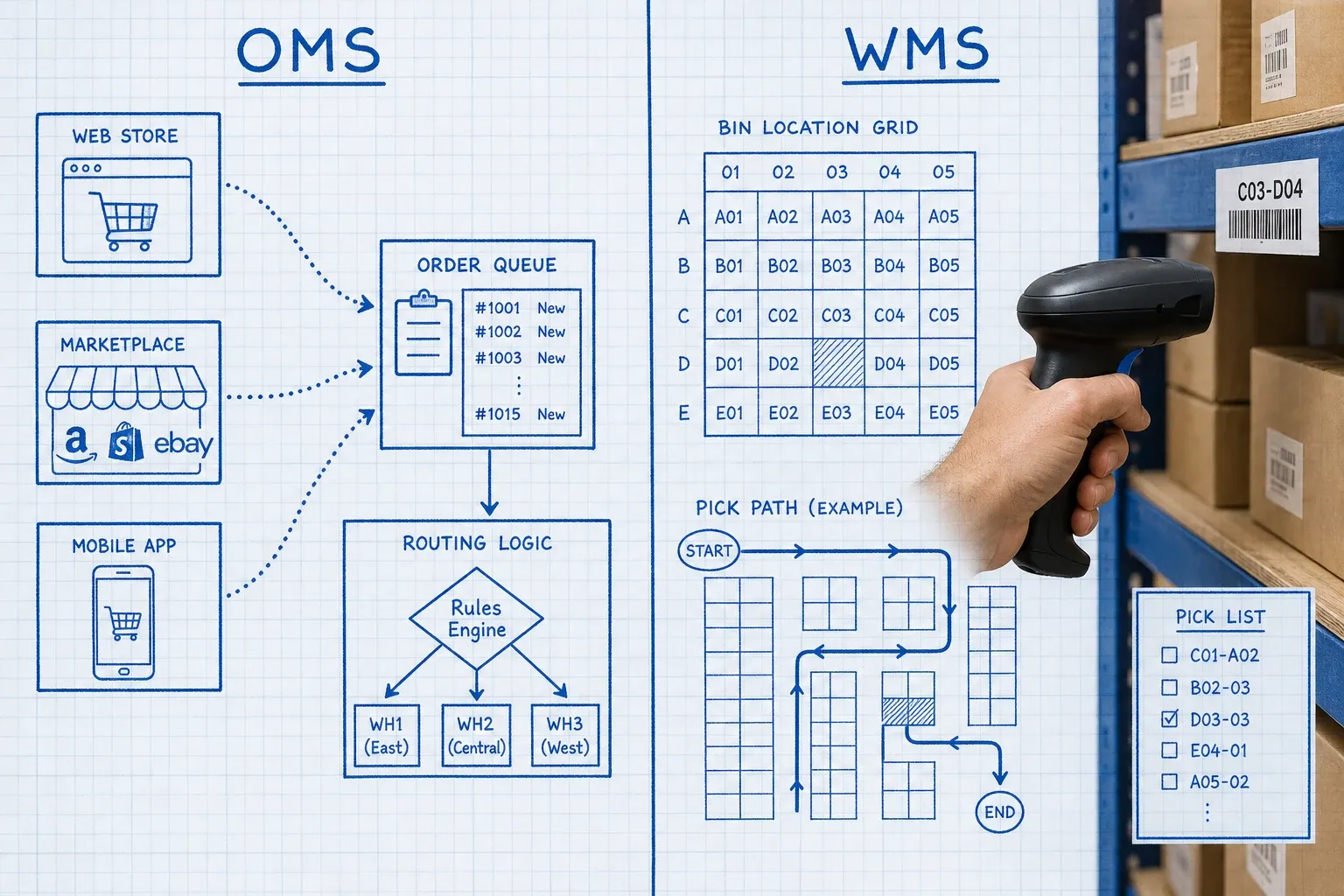
An order management system (OMS) is software that manages orders from the moment a customer places them through every step until they ship, across every channel you sell on. It routes orders, maintains a unified inventory view, and tells your warehouse what to fulfill. A warehouse management system (WMS) manages what happens inside that warehouse: receiving, bin locations, pick paths, packing, and shipping. Both systems touch inventory and both touch orders, but they solve completely different problems.
An OMS is the orchestration layer. A WMS is the execution layer. One manages the order as a business event; the other manages the warehouse as a physical operation.
Whether you need one, the other, or both depends on how many channels you sell on and how complex your fulfillment actually is.
What Does an OMS Actually Do?
An OMS sits between your sales channels and your warehouse. When a customer places an order on Shopify, that order enters your OMS. When someone buys on Amazon at the same time, that order also enters your OMS. The system maintains one authoritative view of what is available to sell, decides which warehouse or fulfillment node should handle each order, and sends the pick instruction downstream to your WMS or 3PL.
The core jobs of an OMS:
- Order ingestion: pulling orders from every channel (Shopify, Amazon, eBay, TikTok Shop, wholesale portals) into one unified queue
- Available-to-promise logic: calculating what is actually available across all locations, accounting for reservations, in-transit stock, and channel-specific holds
- Order routing: deciding which fulfillment node handles each order based on rules you define: proximity to the customer, current stock levels, shipping cost, SLA commitments
- Status updates: pushing tracking numbers and shipment confirmations back to each channel and to your customer
- Returns coordination: receiving return requests, routing them to the right facility, and restocking inventory correctly
What an OMS does not do: it does not manage where a specific box sits in your warehouse, which bin location a picker should walk to, or how your receiving team processes inbound freight. That is the WMS's domain.
How an OMS and WMS Work Together
The two systems sit on either side of a fulfillment instruction. Here is the typical data flow in a connected operation:
- A customer places an order on Shopify
- Your OMS ingests the order, checks available inventory across your facilities, and routes it to the best warehouse
- The OMS sends a fulfillment instruction to your WMS
- Your WMS creates a pick task, guides a picker to the correct bin, and tracks the pack-and-ship workflow
- When the WMS ships the order, it reports back to the OMS with a tracking number and inventory adjustment
- The OMS pushes the tracking update to Shopify and to the customer
Without an OMS, step 2 is manual or fragmented: someone checks each channel separately and tries to prevent double-selling by hand. Without a WMS, step 4 relies on paper pick lists or spreadsheets and produces the kind of inventory errors that kill accuracy.
When Do You Actually Need Both?
You probably need both when:
- You sell on three or more channels (Shopify, Amazon, eBay, TikTok Shop, wholesale)
- You run your own warehouse and process more than roughly 100 to 200 orders per day
- You have inventory split across multiple warehouse locations or a mix of owned warehouse and 3PL
You can often run on a WMS alone (without a dedicated OMS) when:
- You sell primarily on one channel
- Every order ships from one warehouse with no routing decisions required
- Your channel's native dashboard handles order management adequately
According to the Linnworks 2026 Multichannel Operations Report, the average mid-market seller in the US operates on 4.25 channels, yet only one in three describe their cross-channel inventory visibility as "excellent." That gap is exactly where an OMS earns its place.
The Overselling Problem an OMS Solves
Running multiple channels from a shared inventory pool without an OMS is how brands oversell. Each channel thinks you have 50 units. Two customers on different channels buy the last item at nearly the same time. Both orders succeed. You can only ship one of them.
According to the Linnworks 2024 Multichannel Operations Report, brands running three or more sales channels experience oversell incidents at 2.4x the rate of single-channel sellers. Each incident takes an average of 3.1 hours to resolve.
An OMS prevents this by maintaining one master Available-to-Promise record that updates across every channel in real time. When a unit is committed on Shopify, it is reserved in the OMS, and the count on Amazon adjusts within seconds. No spreadsheet, no manual reconciliation, no customer apology emails.
For a deeper look at prevention strategies beyond the OMS layer, see our guide on how to prevent overselling across multiple channels.
Can Your WMS Replace an OMS?
Some WMS platforms include basic multi-channel order management features. A well-built WMS with a solid API can ingest orders from multiple channels, route them to pick tasks, and return tracking numbers to each channel. For simpler operations, this can be enough.
But a WMS is optimized for warehouse execution, not channel orchestration. Real-time Available-to-Promise calculations across distributed inventory, intelligent routing across multiple fulfillment nodes, and returns coordination across multiple storefronts are not where WMS software is designed to shine. You can stretch a WMS to do these things, but you will hit its ceiling during peak season.
Tools like BinLogic WMS connect to OMS platforms via API, receiving fulfillment instructions and returning real-time inventory data. The WMS handles what happens on the floor; the OMS handles what happens above it.
Can an OMS Replace a WMS?
No, for the opposite reason. An OMS knows you have 50 units available to sell. It does not know those 50 units are in bin A3, aisle 7, shelf 2, and that your fastest pick path runs through three zones in a specific sequence. Warehouse execution is a physical problem that requires floor-level tools: barcode scanning, directed pick tasks, packing verification, cycle count workflows, and real-time bin location tracking.
If you are choosing between the two and your primary pain is inventory inaccuracy, missed picks, and slow order processing on the warehouse floor, a WMS is the right starting point. If your primary pain is overselling across channels, manual order routing, and fragmented order visibility, an OMS addresses the problem at the right layer.
Check our full comparison at WMS vs OMS vs ERP: Which System Does Your Ecommerce Brand Actually Need? for a three-way breakdown if you are evaluating all three systems simultaneously.
What About Platforms That Bundle Both?
A growing number of platforms combine OMS and WMS functionality in one product. For smaller operations, this is attractive: one integration, one vendor, one data model. The trade-off is depth. A unified platform handles each function adequately without excelling at either.
The Forrester Wave: Order Management Systems, Q1 2025 notes that the OMS market has shifted toward modular architectures, with digital businesses increasingly adding specialized modules on top of existing platforms rather than replacing entire systems. That same pattern applies to WMS and OMS stacks: many growing brands start with one and layer the other on top as a specialized system, rather than rebuilding from scratch.
As order volume grows past a certain threshold, most operations discover they need the specialist depth of a purpose-built WMS paired with a dedicated OMS, even if a unified platform served them well in earlier stages.
How to Decide: A Practical Framework
Work through these four questions:
How many channels do you sell on? One or two channels with simple, single-warehouse routing: a WMS with basic order ingestion is usually enough. Three or more channels: you need OMS-level orchestration.
Do you have inventory in more than one location? Single warehouse or facility: a WMS handles this well. Multiple warehouses, or a mix of owned warehouse and 3PL: an OMS is how you route orders intelligently across nodes without manual intervention.
What is your daily order volume? Under 100 orders per day: most WMS platforms can cover order management natively. Over 200 to 300 orders across multiple channels: routing logic, ATP calculations, and real-time channel updates benefit significantly from a dedicated OMS.
How complex are your returns? Simple, single-channel returns: your platform handles this. Multi-channel, multi-location returns: an OMS coordinates the return back to the right facility and restocks inventory correctly across all channels.
Building Your Stack in the Right Sequence
Most growing ecommerce brands follow a predictable path:
- Start with their commerce platform (Shopify, WooCommerce) handling both order management and basic inventory
- Add a WMS when warehouse complexity outgrows the native platform, typically around 75 to 150 SKUs and 100-plus daily orders
- Add a dedicated OMS when channel complexity outgrows what the WMS can orchestrate alone
The key is not acquiring the full stack on day one. It is knowing which layer each system is responsible for, so you add the right tool at the right stage of growth instead of forcing one system to do two different jobs badly.
For more on building a solid multichannel foundation, see our guide on multi-channel inventory management.
Getting your OMS and WMS to work together well is a configuration problem, not a strategy problem. Once the data flows cleanly between them, both systems do their jobs without you in the middle. BinLogic WMS is built to connect to your existing order management layer, so the warehouse executes exactly what your OMS instructs, with inventory counts flowing back in real time.
Frequently asked questions
What is the difference between an OMS and a WMS?
An OMS (Order Management System) manages the order lifecycle across your sales channels: ingesting orders, syncing inventory availability, and routing fulfillment instructions. A WMS (Warehouse Management System) manages execution inside a specific warehouse: receiving, bin locations, pick paths, packing, and shipping. The OMS tells your warehouse what to fulfill; the WMS handles how it gets done on the floor.
Do I need an OMS if I already have a WMS?
Not necessarily. If you sell on one or two channels with straightforward routing, your WMS can often handle order management natively. You need a dedicated OMS when you sell on three or more channels, when orders need to route intelligently across multiple fulfillment nodes, or when channel-level inventory sync is causing oversells. The trigger is channel and location complexity, not order volume alone.
Can a WMS replace an OMS?
A WMS can handle basic order ingestion from multiple channels, but it is optimized for warehouse execution, not cross-channel orchestration. It does not maintain a real-time Available-to-Promise inventory view across distributed locations, and it is not built to route orders based on customer proximity, SLA rules, or split-fulfillment logic. For simple operations, a WMS with API integrations can stretch to cover OMS functions. For multi-channel, multi-location operations, you will hit its ceiling quickly.
What does an OMS do that a commerce platform like Shopify cannot?
Shopify manages your Shopify orders. An OMS sits above all your channels and treats every order from every platform as part of one connected operation. It maintains a unified inventory record that updates across Shopify, Amazon, eBay, and any other channel the moment a unit is committed, which is something each channel's native dashboard cannot do on its own. It also handles intelligent order routing and cross-channel returns coordination.
When should a growing ecommerce brand add an OMS?
Most brands add an OMS when they start selling on three or more channels and experience their first oversell events, or when they open a second fulfillment location. A single-channel, single-warehouse operation rarely needs a separate OMS. The inflection point is usually 200-plus orders per day across multiple channels, or whenever manual inventory reconciliation between platforms is consuming meaningful team time.
Run your warehouse without losing a single unit.
Binlogic is the warehouse management system for brands and retailers who run their own fulfillment. Receive, count, pick, pack and ship, with every move scanned. See it in a 30-minute demo.
Get a demo