How to Sync Inventory Across Shopify, Amazon, and eBay
Syncing inventory across Shopify, Amazon, and eBay means connecting all three to a single authoritative stock count that updates automatically the moment any sale, return, or adjustment occurs. Without real-time sync, manual multi-channel operations see oversell rates of 3-8% per month. The fix is one central inventory hub -- whether a WMS, IMS, or dedicated multichannel tool -- that pushes quantity updates to every channel within seconds via webhooks.
Syncing inventory across Shopify, Amazon, and eBay means connecting all three channels to one authoritative stock count that updates automatically the moment any order arrives. Without that connection, you are manually chasing numbers across three platforms -- and manual multi-channel operations see oversell rates of 3-8% per month, according to Digital Commerce 360's 2025 Multi-Channel Benchmarks.
Inventory sync is the process of maintaining one central stock count and propagating quantity updates to every sales channel in real time, so no two channels can ever sell the same unit.
The mechanics are straightforward in principle: one system owns the count, every channel reads from it, and every sale or return writes back to it. Getting there requires clean SKU mapping, the right sync architecture, and a clear understanding of where each platform falls short on its own.
Why Each Channel Cannot Manage Its Own Inventory
Shopify, Amazon, and eBay each have their own inventory ledger. By default, these ledgers are independent. When a unit sells on Amazon, Shopify's count stays exactly where it was until something updates it. That "something" is either a human checking both platforms and making a manual edit, or an automated sync tool that fires the moment the Amazon order lands.
At one or two channels with low volume, manual tracking can hold. At three channels with any meaningful sales velocity, it breaks fast. According to the Mirakl 2026 Seller Report, 34% of ecommerce sellers now operate on two or more marketplaces. Sellers on three or more channels see 104% higher gross merchandise value than single-channel sellers -- but only if their operations keep up.
The operational risk is not just occasional oversells. Marketplace penalties are real. Amazon will suppress listings and suspend accounts if your cancellation rate from oversells breaches its threshold. eBay's defect rate system works the same way. Every cancelled order from an oversell costs you a customer, a review, and potentially your marketplace standing.
How Real-Time Inventory Sync Actually Works
A proper sync setup has three components:
A central inventory hub. This is your single source of truth. It could be a warehouse management system (WMS), an inventory management system (IMS), or a dedicated multichannel tool. Every channel reads available quantity from this hub and every transaction writes back to it.
Bidirectional channel connections. Each platform -- Shopify, Amazon Seller Central, eBay -- connects to the hub via API. The connections must be bidirectional: sales on any channel reduce the hub count, and the hub pushes the updated count back out to every other channel simultaneously. One-way setups, where Amazon sales reduce your Shopify stock but not vice versa, guarantee drift.
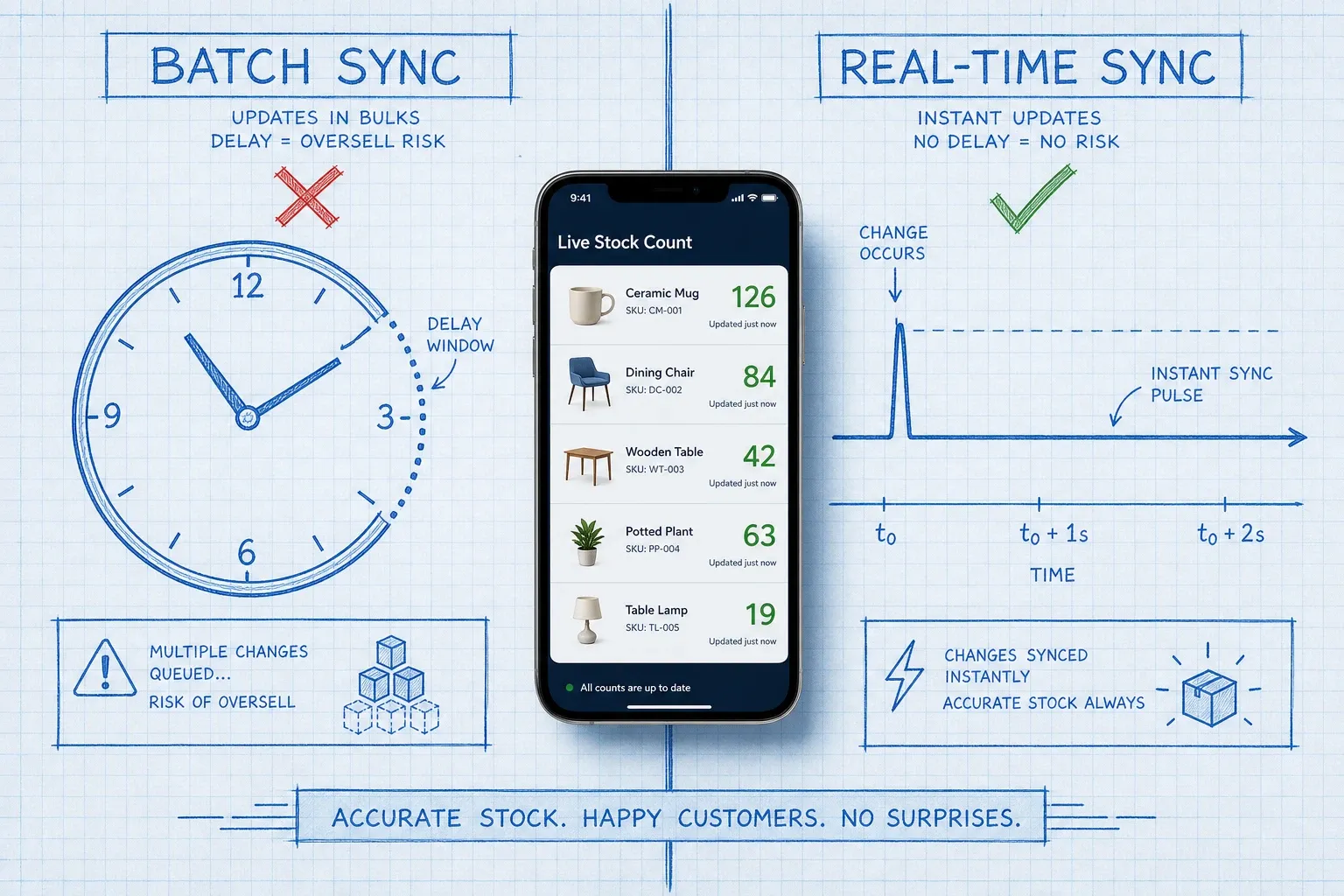
Webhook-driven triggers (not scheduled polling). When an order lands on any channel, a webhook fires an event to the hub in real time. The hub decrements available quantity and immediately pushes the updated count to all other channels. This is fundamentally different from polling -- where the system checks for new orders on a timer every 15 or 30 minutes. During that window, multiple channels can sell from the same pool before anyone knows.
According to NRF 2025, brands with synchronized multi-channel inventory reduce oversell incidents by 85-95% and cut order processing time by 40-60% compared to manual or batch-sync operations.
Setting Up the Connection: Shopify, Amazon, eBay
Shopify
Shopify's inventory API is the most developer-friendly of the three. It fires webhooks on `inventory_levels/update` events, which trigger when available quantity changes. Your inventory hub subscribes to these events and processes them as orders land.
One detail most documentation skips: Shopify models inventory across seven states -- incoming, on-hand, available, committed, reserved, damaged, and safety stock. Only changes to `available` and `on-hand` emit the standard webhook. Movements into `committed` or `reserved` states during checkout do not fire the same event. If your sync tool only watches the quantity webhook, there is a brief window during Shopify's checkout reservation where stock appears available to other channels even though Shopify has held it. A well-built hub accounts for this with a small safety buffer.
Amazon
Amazon Seller Central provides inventory feeds and API access for updating available quantities on your listings. Unlike Shopify, Amazon does not send outbound webhooks to notify your system when an order lands -- you need to poll Amazon's order API or use Amazon's Selling Partner API (SP-API) with a notification subscription. This polling model makes Amazon the slowest link in most sync setups.
For FBA inventory, Amazon manages the physical stock. Your hub still needs to know how many FBA units are available, so the count it broadcasts to Shopify and eBay reflects what Amazon can actually fulfill. Sync FBA available counts via SP-API, and keep a separate view for FBM (merchant-fulfilled) stock.
eBay
eBay also uses a polling model rather than outbound webhooks for inventory updates. Your hub pulls eBay order reports on a regular interval, processes new orders, and updates eBay listing quantities via the Inventory API. Because eBay requires you to push quantity updates rather than just receiving them, the sync direction is hub-to-eBay rather than event-driven.
For eBay, a 1-5 minute polling interval catches most orders quickly enough for normal volume. For high-velocity periods, tighten the polling interval or use eBay's Notification service for order events.

The SKU Mapping Problem (and Why It Breaks Everything)
The most common reason sync setups fail is not the technology. It is SKU mapping.
Shopify, Amazon, and eBay all use different product identifiers. Shopify uses your internal SKU. Amazon uses ASINs and seller SKUs. eBay uses item IDs and your own custom labels. Without a master mapping that binds all three to a single canonical SKU in your hub, a sale on one channel cannot reliably decrement the right item everywhere else.
Before you connect a sync tool, audit your catalog:
- Every product in Shopify needs a SKU field populated
- Every Amazon listing needs a seller SKU that matches (or is explicitly mapped to) the Shopify SKU
- Every eBay listing needs the same mapping
Bundles and kits add complexity. If you sell a bundle on Amazon that contains two SKUs from Shopify, the sync logic needs to decrement both component SKUs when the bundle sells. A hub that does not support kit components will create phantom inventory on the component SKUs every time a bundle sells.
Safety Buffers: What They Are and Why You Need One
A safety buffer is a quantity you withhold from your published channel counts. Instead of listing all 50 available units, you list 47 on each channel and keep 3 as a buffer.
The buffer exists because sync is not instantaneous. Even with webhook-driven sync, there is a 2-30 second window between when an order lands and when every channel's count updates. During a flash sale or viral product moment, multiple channels can fire orders in that window.
The right buffer size depends on your order velocity and channel count. For most mid-market brands with 3 channels and normal velocity, 2-5 units is enough. During peak events, raise it temporarily.
Do not confuse a safety buffer with splitting inventory between channels. Splitting means reserving 30 units for Amazon and 20 for Shopify independently. This leaves money on the table: if Amazon's 30 sell out, you show out-of-stock there even though 20 units sit idle in the Shopify allocation. A shared pool with a safety buffer is always better.
Returns: The Sync Step Most Brands Get Wrong
Returns need to complete the loop. When a customer returns a unit, that stock does not automatically go back into your available count -- it needs to be inspected, restocked, and the quantity pushed back to all channels.
A good sync setup handles this in sequence: return received and inspected, item restocked in the WMS or hub, available count incremented, update pushed to Shopify, Amazon, and eBay. Skip any step and you end up with invisible inventory -- stock that exists physically but does not show up as available on any channel.
On Amazon FBA returns, Amazon restocks items automatically into FBA available inventory under certain conditions. Monitor your FBA stranded inventory regularly -- units Amazon has restocked but not made available for sale show up here.
What to Look for in a Sync Tool or WMS
Whether you use a standalone multichannel sync tool or a full WMS with channel integrations, the requirements are the same:
Native connections to Shopify, Amazon, and eBay. Middleware layers that translate between your system and the channel APIs add latency and failure points. Prefer direct integrations.
Webhook-driven inbound sync. The system should react to order events immediately, not batch them.
Bidirectional sync. Sales on every channel must write back to the central count. The update must flow out to every other channel simultaneously.
Kit and bundle support. If you sell bundles or kits, the system must decompose them into component SKUs for inventory deduction.
Configurable safety buffers per channel. Different channels may need different buffers based on their sync latency.
Return processing. Returns from every channel must post back to the central count.
Tools like BinLogic WMS include multichannel sync as part of the warehouse management layer, so the same system that manages your receiving, put-away, and pick-and-pack also owns the count that drives Shopify, Amazon, and eBay. That removes the gap between what your WMS says is available and what your channels are listing.
If you want to go deeper on the channel-side strategy, read the multi-channel inventory management guide and the breakdown of how to prevent overselling for the specific tactics that complement the sync setup.
Common Sync Mistakes to Avoid
Running one-way sync. If Amazon sales reduce Shopify stock but Shopify sales do not update Amazon, you will eventually oversell on Amazon.
Ignoring Amazon FBA available vs. reserved counts. FBA inventory is not always all available. Units in reserved, stranded, or unfulfillable states should not count toward your listing quantity.
Forgetting eBay's polling lag. eBay does not push real-time order events the same way Shopify does. If you set your eBay polling interval to hourly to reduce API calls, you have a one-hour window where a sold item can oversell.
Skipping the returns loop. Returned units that are not restocked and synced back to channels become invisible inventory.
Setting buffers too high. A buffer of 20 units on a 25-unit SKU means you show 5 available everywhere. This wastes most of your stock and can make you look chronically low-stocked. Keep buffers proportional to order velocity.
The Result: One Count, Every Channel, Zero Surprises
Inventory sync is not glamorous. But getting it right is the difference between a multi-channel operation that scales and one that causes constant firefighting. When one count drives Shopify, Amazon, and eBay simultaneously -- updating within seconds of every order, return, and adjustment -- you can sell confidently on every channel without holding back buffer stock or babysitting spreadsheets.
Start with clean SKU mapping. Connect each channel bidirectionally to one hub. Use webhook-driven sync where the channel supports it, polling where it does not. Add a small safety buffer. Close the returns loop. That is the whole system.
If you are also asking whether you need an OMS alongside these channels, the OMS vs WMS breakdown covers exactly when order routing logic needs its own layer.
Frequently asked questions
What does it mean to sync inventory across Shopify, Amazon, and eBay?
Inventory sync means all three channels draw from the same stock count and update automatically when any sale, return, or adjustment happens. When a unit sells on Amazon, the available quantity on Shopify and eBay drops within seconds -- no manual entry, no batch update delays.
What is the difference between real-time sync and batch sync?
Real-time sync uses webhooks to push a quantity update the moment an order lands, typically within 2-30 seconds. Batch sync runs on a schedule -- every 15 minutes, every hour, or daily. During the batch window, two channels can both sell the last unit before either count updates, which is where oversells come from.
How fast does inventory sync need to be to prevent overselling?
For most brands, sub-60-second sync is enough to eliminate the vast majority of oversells during normal trading. During peak events like Black Friday, aim for sub-10-second webhook-driven sync. Brands using 15-minute batch sync routinely oversell during any sales spike.
Do I need a WMS to sync inventory across Shopify, Amazon, and eBay?
Not necessarily. A dedicated inventory management system (IMS) or multichannel tool can handle channel sync without full WMS functionality. A WMS becomes the right choice when you also need to manage physical warehouse operations -- receiving, put-away, pick and pack, bin locations -- alongside channel sync.
How do I handle returns in a multi-channel sync setup?
Returns need to write back to the same central inventory count that drives all channels. When a customer returns a unit via Amazon, the WMS or IMS should receive the return event, inspect and restock the item, then push the updated count back to every channel. Skipping this step means returned stock sits invisible while channels show false out-of-stock counts.
Run your warehouse without losing a single unit.
Binlogic is the warehouse management system for brands and retailers who run their own fulfillment. Receive, count, pick, pack and ship, with every move scanned. See it in a 30-minute demo.
Get a demo