Shopify + WMS Integration: Setup and What to Expect
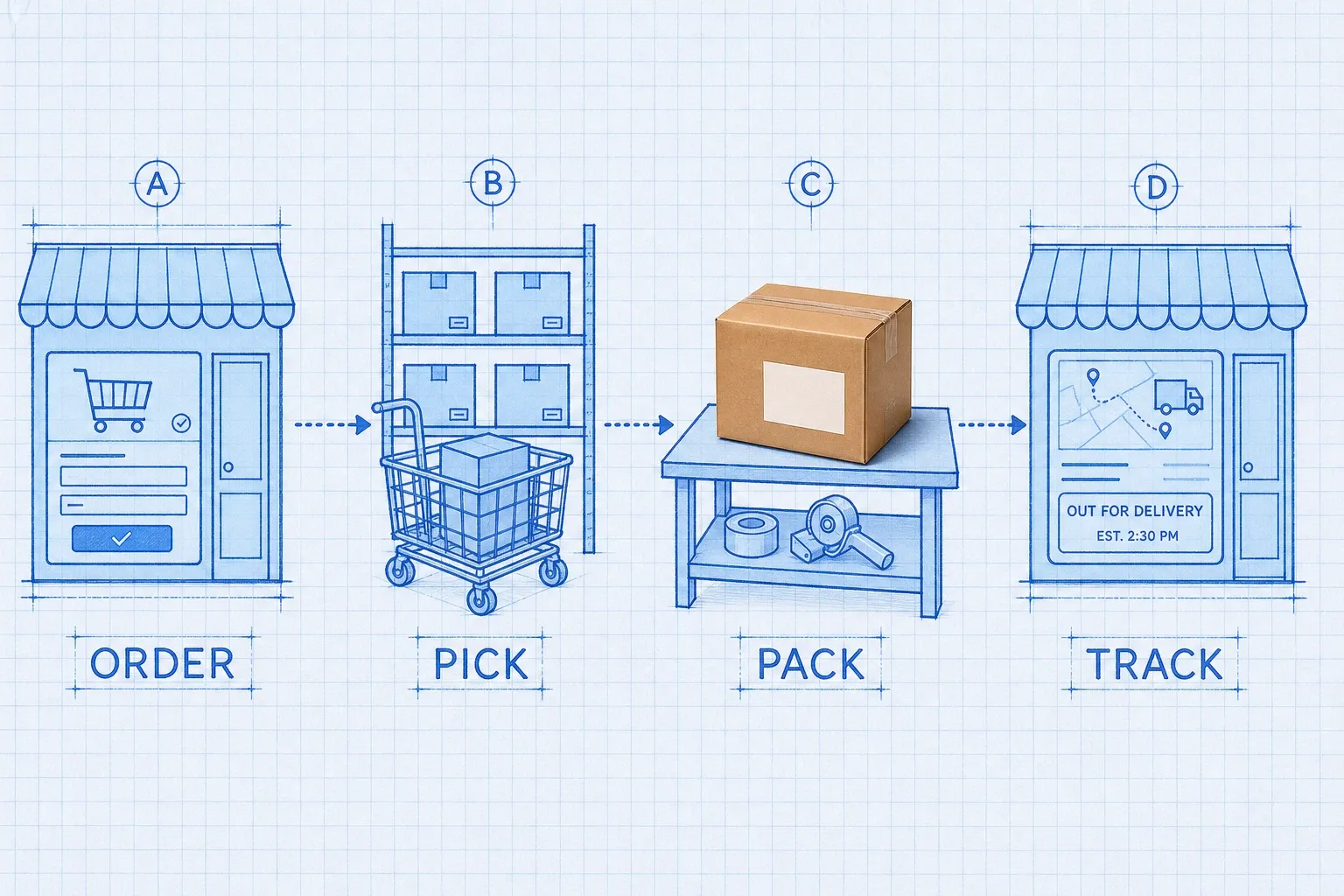
A Shopify WMS integration is a bidirectional connection that sends orders from Shopify into your warehouse system and pushes inventory levels, fulfillments, and tracking numbers back to the storefront. Setup usually means connecting the Admin API, matching SKUs, mapping locations, testing order and stock flows, then going live with a clean inventory baseline. Expect near-real-time sync, fewer oversells, and a short period of monitoring while you tune reconciliation.
A Shopify WMS integration is the bidirectional connection that moves orders from your storefront into warehouse software and pushes inventory levels, fulfillments, and tracking numbers back to Shopify. Once it is live, your warehouse becomes the source of truth for what you can sell, and Shopify stops relying on manual CSV uploads or last-minute spreadsheet edits.
A Shopify WMS integration is the API-based link that keeps storefront orders, stock, and shipment status in sync with the system that runs receiving, picking, packing, and shipping on the floor.
If you already sell on Shopify and still copy orders into a packing sheet, or if stock drifts every time you add Amazon or a wholesale channel, this guide walks through what the integration actually does, how setup usually unfolds, and what the first month feels like. For a broader look at choosing the right system for a Shopify brand, see our guide to the best WMS for Shopify brands in 2026.
Why connect Shopify to a WMS at all?
Shopify is excellent at selling. It is not a warehouse execution layer. Native inventory tracking works when you have one location, a modest SKU count, and a team that can babysit stock. It starts to break when you add bin locations, multi-warehouse routing, barcode-driven picks, or same-day ship cutoffs.
A WMS (warehouse management system) owns the physical side: where each unit sits, which pick path to run, how put-away works after a PO lands, and when a carton is ready to leave the dock. The integration is the bridge. Without it, you re-type orders, guess at available stock, and discover oversells after the customer has already paid.
That gap is expensive at scale. According to Nucleus Research, organizations typically improve inventory accuracy by about 20 percent within a year of deploying a WMS, and 46 percent of the organizations studied increased accuracy inside that first year. Separately, IHL Group has estimated that global retail inventory distortion (out-of-stocks plus overstocks) costs roughly $1.77 trillion annually, with out-of-stocks alone around $1.2 trillion. You do not need enterprise volume for those problems to show up as cancelled orders and angry support tickets.
What data moves in each direction?
Think of two highways, not one dump of CSV files.
Shopify to WMS
- New orders (line items, quantities, shipping address, tags, notes)
- Order edits before pick starts
- Cancellations
- Product and variant create/update events (SKU, barcode, title)
- Sometimes return or refund signals, depending on your connector
WMS to Shopify
- Inventory level changes by location (receives, picks, adjustments, cycle counts)
- Fulfillment confirmations with carrier and tracking number
- Partial fulfillments when you ship in waves
- Restocks after returns are checked in
Modern connectors lean on Shopify's Admin API and webhooks (`orders/create`, `orders/updated`, `orders/cancelled`, inventory events) rather than nightly batch jobs. Fulfillment should post through Shopify's FulfillmentOrder model so split shipments stay accurate per line. Inventory updates should prefer delta adjustments when possible, so two systems do not overwrite each other during a busy hour.
Webhooks alone are not enough. Missed events happen. A healthy Shopify WMS integration always pairs real-time events with a reconciler that compares stock (and sometimes open orders) on a schedule and repairs drift.
How do you set up a Shopify WMS integration?
Every vendor's UI looks different, but the operational sequence is the same. Skip a step and you will spend go-live week chasing ghosts.
1. Decide what is the source of truth
Before you connect anything, write this down: the WMS owns on-hand warehouse inventory. Shopify owns the storefront catalog and customer checkout experience. After go-live, warehouse counts update Shopify. Do not let a second inventory app keep writing competing levels into the same locations.
2. Clean the product master
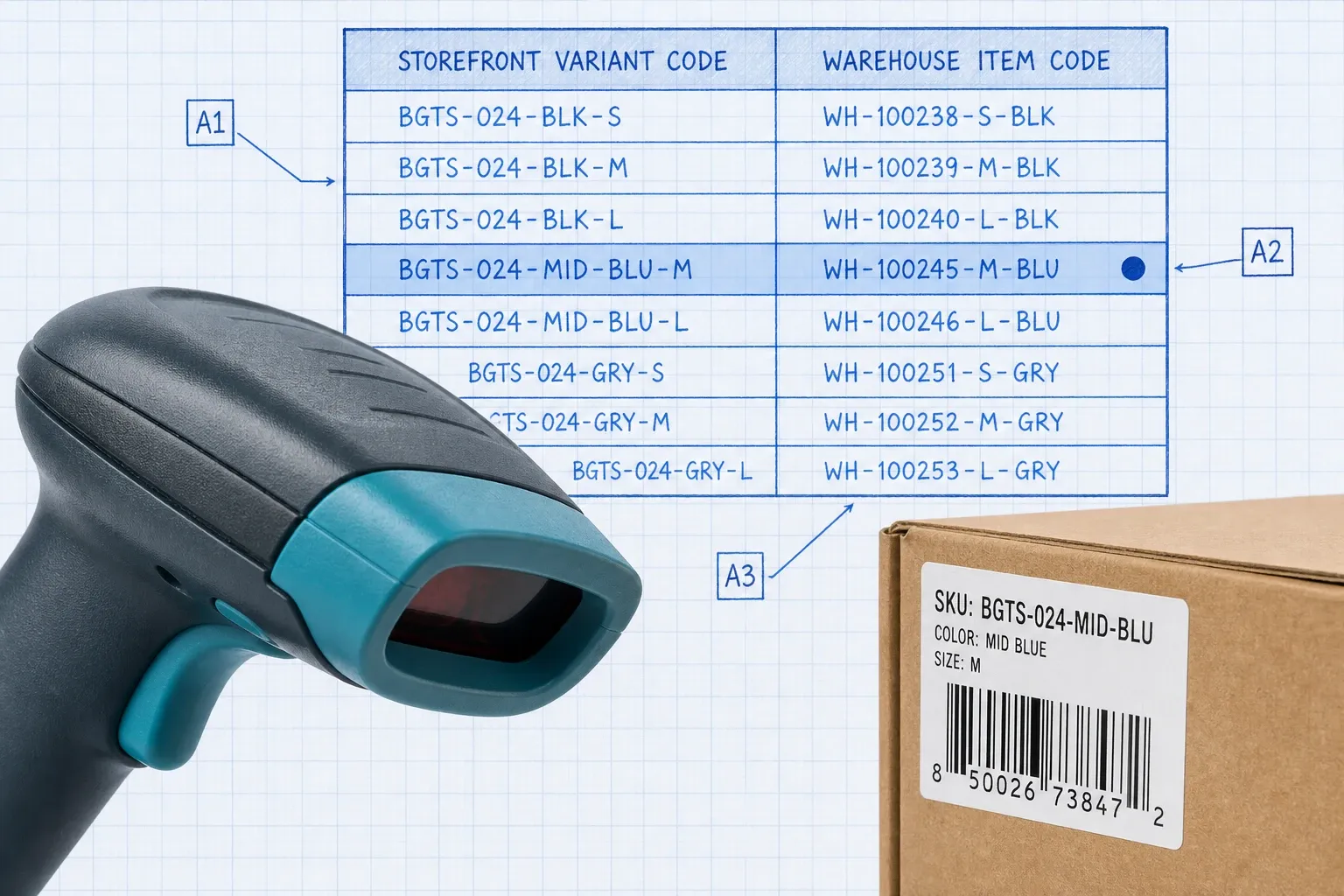
Match every sellable Shopify variant to a WMS item by SKU (or barcode if that is your cross-reference). Fix duplicates, blank SKUs, and kit/bundle definitions first. SKU mismatch is the number one reason integrations "work" but still create unfulfillable orders.
3. Map locations and fulfillment services
Create or claim a Shopify Location for each warehouse the WMS will manage. Register the WMS (or its fulfillment service) so customer notifications and tracking attribution stay correct. If you run multiple warehouses, define routing rules now: nearest warehouse, preferred DC, or channel-based splits.
4. Connect the app and grant scopes
Install the WMS Shopify app (or approve the OAuth install link). Typical scopes cover orders, products, inventory, locations, and fulfillments. Use the minimum set your connector needs. Confirm webhook subscriptions are active after install.
5. Align starting inventory
Do a physical or cycle-count baseline in the WMS. Push that clean snapshot into Shopify (or set quantities from the WMS) before you open the order floodgates. Launching on dirty stock guarantees oversells on day one.
6. Sandbox end-to-end tests
Run test orders for: single-line ship, multi-line split, partial fulfill, cancel-before-pick, cancel-after-pick (should reject or require a restock), and a receive that bumps available quantity. Verify tracking lands on the Shopify order and the customer notification fires.
7. Phased go-live
Start with a low-risk SKU set or a single location if you can. Watch order lag, fulfillment lag, and inventory variance for a few days, then open the full catalog. Tools like BinLogic WMS are built around this Shopify-connected flow so warehouse events write inventory and tracking back without a separate spreadsheet ritual.
What should you expect after go-live?
The first week is about confidence, not perfection.
Orders should appear in the WMS within seconds of checkout. If they take minutes, check webhook health and rate limits before blaming the floor team.
Inventory should move after receive, pick, adjust, and count events. Expect a small backlog of variance tickets while you catch historical SKU issues. Track a simple daily metric: count of SKUs where Shopify available and WMS available disagree by more than your tolerance (often one unit for mid-market brands).
Fulfillment should post tracking when pack confirms, not when the label prints and sits on a desk. Partial ships should leave remaining lines open in both systems.
People will ask "is something wrong?" more than they ask for new features. Give them a short ops dashboard: order-to-pick lag, pick-to-tracking lag, inventory variance count, and reconciler catch-ups in the last hour. That closes most Slack threads.
By week two to four, the novelty fades. Your team stops exporting Shopify orders. Support stops guessing stock from memory. Peak weeks hurt less because the storefront reflects what the bins actually hold. If you also sell on Amazon, eBay, or other channels, pair this foundation with the patterns in how to sync inventory across Shopify, Amazon, and eBay and how to prevent overselling across multiple channels.
Which pitfalls catch Shopify brands most often?
Two systems writing inventory. Leaving Shopify's native inventory edits, a spreadsheet app, and the WMS all active on the same location creates race conditions. Pick one writer for warehouse stock.
Ignoring FulfillmentOrders. Legacy fulfillments endpoints struggle with splits. Use the modern fulfillment order graph so line-level status stays honest.
No reconciler. Webhooks miss events under load. Hourly inventory and nightly order reconciliation are boring and essential.
Bundles and kits undefined. If Shopify sells a kit but the WMS only knows components (or the reverse), picks and stock will disagree. Define the BOM in the WMS and map the parent SKU carefully.
Going live without a count. Beautiful connector, wrong starting numbers. Customers feel that immediately.
Assuming "real-time" means zero lag forever. API rate limits, bulk catalog updates, and carrier label queues introduce delay. Design for seconds normally and minutes under stress, with alerts when lag crosses your SLA.
How do you know the integration is healthy?
Use three operational checks, not a gut feel.
- Order latency: time from Shopify `orders/create` to visible WMS work order. Target: under a minute for most mid-market volumes.
- Inventory agreement: sample or full-catalog compare of available units by SKU and location. Investigate anything outside your tolerance daily in week one.
- Fulfillment loop: time from pack confirm in the WMS to tracking visible on the Shopify order and in the customer email.
If those three stay green, the integration is doing its job. If one drifts, fix process or mapping before you add another sales channel.
When is a Shopify WMS integration worth it?
You are ready when at least two of these are true:
- You ship from a real warehouse (or multiple) with bin or zone structure
- Manual order entry or CSV inventory updates eat hours every week
- You oversell or undersell because Shopify stock lags the floor
- You are adding channels and cannot trust one available-to-sell number
- Peak season volume already stretches the team without more headcount
You can wait if you are still dropshipping everything, or if one person packs ten orders a day from a closet and never loses track. The integration pays off when the storefront and the physical stock must stay honest without a human in the middle of every update.
Soft next step
If you want Shopify orders, bin-level inventory, and tracking updates in one warehouse system instead of three tabs, look at a WMS that treats Shopify as a first-class channel rather than a bolted-on CSV. BinLogic is built for that mid-market pattern: connect the store, map SKUs and locations, and let warehouse events keep the storefront honest while your team picks.
A clean Shopify WMS integration is not a science project. It is a short setup of truth ownership, SKU matching, location mapping, sandbox tests, and disciplined reconciliation. Do those well, and "what to expect" is simple: orders flow in, stock flows out, tracking comes back, and your team stops living in spreadsheets.
Frequently asked questions
What is a Shopify WMS integration?
It is a bidirectional link between your Shopify store and a warehouse management system. Orders and cancellations flow from Shopify into the WMS. Inventory updates, fulfillment confirmations, and tracking numbers flow from the WMS back to Shopify so customers see accurate stock and shipment status.
How long does Shopify WMS integration setup take?
Native or pre-built connectors often go live in about two to four weeks if your SKUs and locations are clean. Custom middleware, multi-warehouse routing, or messy product masters can stretch that to one to three months. The calendar is usually driven by data cleanup more than by the connector itself.
Do I need Shopify Plus for a WMS integration?
No. Shopify Admin API access on a paid plan is enough for most WMS connectors. Multi-location inventory is available on paid plans. Plus helps with higher API limits and advanced checkout features, but it is not a hard requirement to connect a warehouse system.
What data should sync between Shopify and a WMS?
At minimum: products and variants by SKU, location-level inventory, new and updated orders, cancellations, fulfillments with tracking, and returns or restocks when you process them in the warehouse. Nice-to-haves include lot or serial data, kits and bundles, and reserved stock rules if your WMS supports them.
What should I expect in the first 30 days after go-live?
You should see orders landing in the WMS within seconds, inventory deltas posting back after receive, pick, and adjust events, and tracking appearing on Shopify once a pack confirms. Plan for daily variance checks in week one, then move to hourly or nightly reconciliation as the sync stabilizes. Fix SKU mismatches early; they cause most post-launch noise.
Run your warehouse without losing a single unit.
Binlogic is the warehouse management system for brands and retailers who run their own fulfillment. Receive, count, pick, pack and ship, with every move scanned. See it in a 30-minute demo.
Get a demo